

User Access Rights Pro
Point at what they shouldn't see. Click. It's gone.
Manage ODOO access rights visually and securely. Restrict fields, buttons, menus and other interface elements directly from the screen — without complicated XML configuration.
Access Control
Fields & Menus
Secure Access

User Access Rights Pro
Point, click and control what every ODOO user can access.
Why User Access Rights Pro
Hiding one field used to take a developer.
Access management in ODOO can become complicated when every small permission requires technical configuration.
User Access Rights Pro makes access control visual and easier to manage.
Point at what users shouldn't see, configure the restriction and publish it when you're ready.
Access Control
Four things in the box.
Everything you need to manage ODOO user access from one place.
User Access
Control what individual users can access inside ODOO.
Field Restrictions
Restrict specific fields without having to edit technical views.
Buttons & Menus
Hide buttons, menus and actions that users should not access.
Access Control
Keep permissions organized and control access without unnecessary developer work.
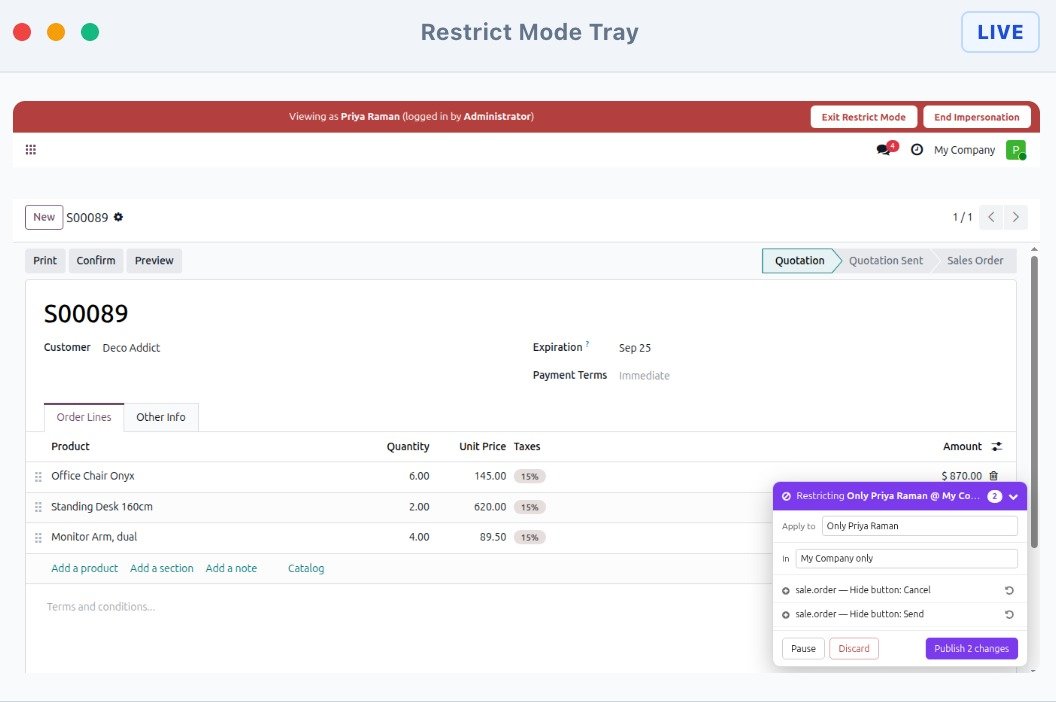
Restrict Mode
Hover. Tick. Publish.
Configure access restrictions directly on the ODOO interface. No complicated configuration screens are required.
01
Point at the Element
Move across the ODOO interface and select the element you want to control.
02
Choose the Restriction
Select the access restriction you want to apply to the selected field, button or menu.
03
Configure Access
Define which users or access groups should see or use the selected element.
04
Publish
Review your changes and publish them when everything is ready.
Publish Flow
They see nothing until you press Publish.
Configure restrictions safely before making them live.
Draft → Review → Publish
Draft
Configure your access restrictions while you work.
Review
Check the selected users, fields and interface elements.
Publish
Publish your restrictions when everything is ready.
Access Controls
41 restrictions.
A wide range of access controls lets administrators manage exactly what users can see and do inside ODOO.
Fields
Control visibility and access to individual fields.
Buttons
Restrict buttons and actions that users should not use.
Menus
Control access to ODOO menus and navigation items.
Views & Actions
Manage access to important ODOO interface elements and actions.
User Inspection
Walk in as them. Wearing a red banner.
See ODOO from another user's perspective and understand exactly what that user can access.

01
Select a User
Choose the ODOO user you want to inspect.
02
See Their ODOO
Open ODOO from that user's perspective.
03
Check Their Access
Verify the fields, buttons, menus and actions available to the selected user.
04
Manage Restrictions
Make changes when access needs to be adjusted.
Security Inspection
13 checks read your live database.
Review important access and security settings directly against your live ODOO environment.
Security Inspection
Run a focused inspection of your ODOO access configuration and identify areas that may require attention.
FAQ
Straight answers.
Clear answers to common questions about ODOO access management, permissions, restrictions, and user security.
What is an ODOO Access Management module?
It allows administrators to control what users can see and do in ODOO based on their roles, responsibilities, and access requirements.
Can I restrict access to specific ODOO menus?
Yes. Access-management modules can be used to control which menus and sub-menus are visible to particular users or user groups.
Can I restrict access to specific fields?
Yes. You can configure restrictions for individual fields, such as making them invisible, read-only, or required.
Can I restrict access to specific records?
Yes. Record-level restrictions can be configured to control which records a particular user can access.
Can I restrict Create, Edit, Delete, or Archive operations?
Yes. Access permissions can be configured to control common operations such as creating, editing, deleting, archiving, and duplicating records.
Can access restrictions be applied to custom ODOO modules?
Yes. Access-management solutions can generally be configured for standard as well as custom modules, depending on the specific configuration and module implementation.
Can I restrict buttons and actions for specific users?
Yes. You can control the visibility or availability of particular buttons and actions according to configured access rules.
Can I create different access permissions for different users?
Yes. Administrators can configure different access rules according to users, groups, roles, or access profiles.
Can I restrict access based on companies?
Yes. Company-specific access restrictions can be configured where supported by the module and ODOO setup.
Can I change or update access permissions later?
Yes. Administrators can modify existing access configurations whenever business requirements change.
Do I need technical knowledge to configure access permissions?
Basic ODOO knowledge is helpful, but these modules are designed to make access management easier through configuration rather than requiring custom development for every restriction.
Will access restrictions affect all users?
Not necessarily. Restrictions can be configured for specific users, groups, roles, or profiles, depending on how the access-management module is configured.
Can I use these modules with ODOO 19?
Yes. Both modules you shared are listed specifically for ODOO 19.
Can I use access management for multiple departments?
Yes. You can configure different access rules for users working in departments with different responsibilities, such as Sales, HR, Accounting, Inventory, or Operations.
Can I remove an access restriction later?
Yes. Administrators can edit or remove configured restrictions when they are no longer required.
Version 19.0.1.0.0
User Access Rights Pro is built for ODOO 19 and provides a visual approach to managing user access and restrictions.
User Access Rights Pro
Ready when you are.
Take control of ODOO access. Point at what users shouldn't see, configure the restriction and publish when you're ready.